• Point of Sale
  • Categories
    • Getting Started with SalesPlay
    • Web POS
    • Sales
    • Product
    • Inventory
    • User
    • Customers
    • Reports
    • Settings
  • Community
  • Point of Sale
  • Categories
    • Getting Started with SalesPlay
    • Web POS
    • Sales
    • Product
    • Inventory
    • User
    • Customers
    • Reports
    • Settings
  • Community
Home/Knowledge Base/Reports/Inventory Valuation Report in SalesPlay

Inventory Valuation Report in SalesPlay

February 12, 2026 Updated on February 17, 2026

What Is the Inventory Valuation Report?

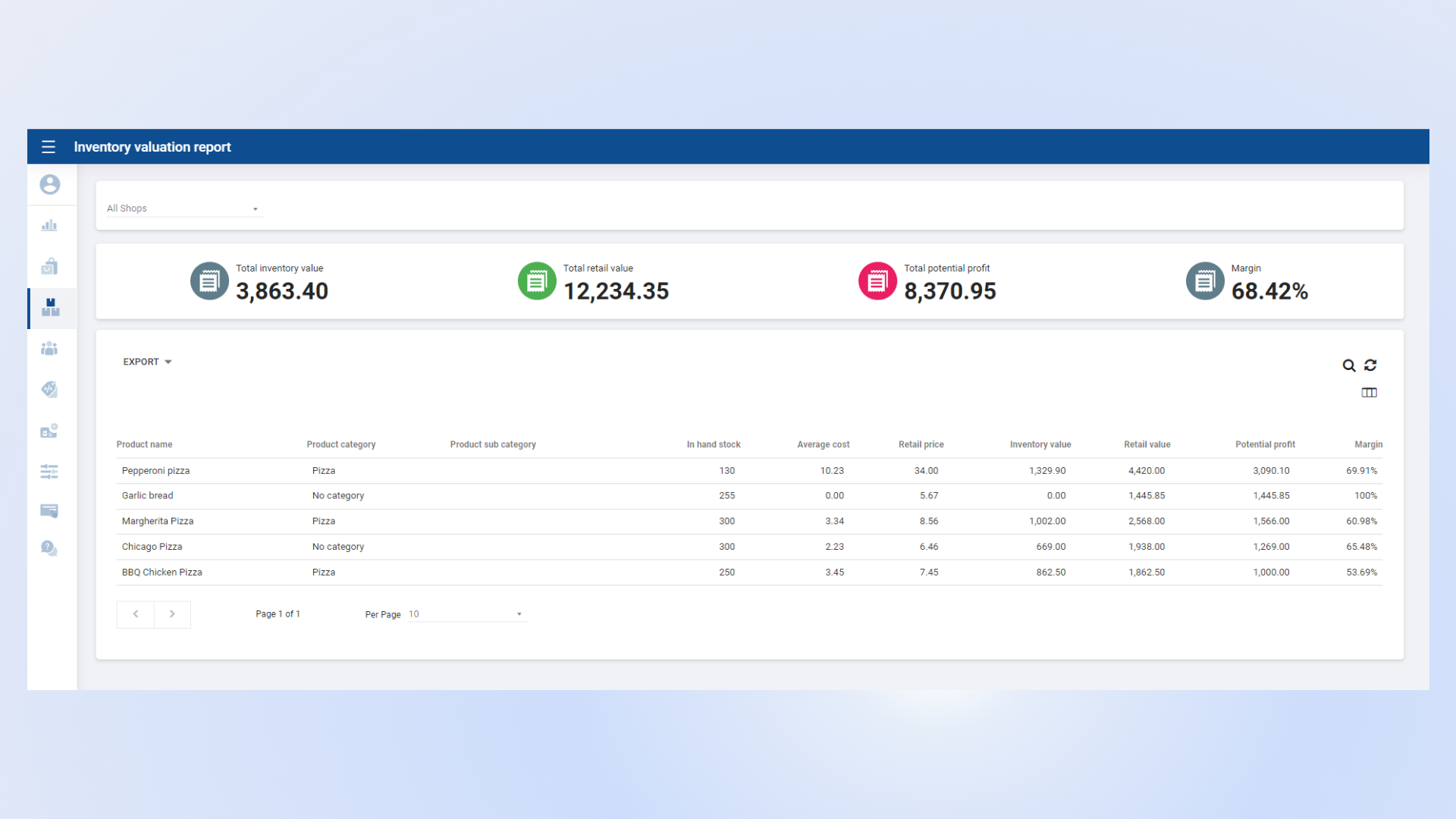
  • The SalesPlay Inventory Valuation Report helps business owners, managers, and accountants monitor inventory performance and in-hand stock levels.
  • It allows you to assess the total value of inventory for financial reporting purposes.
  • The report supports better decision-making for pricing, restocking, and overall inventory control.

Inventory Valuation Report Dashboard View

Key Information Available in the Inventory Valuation Report

  • Total Retail Value – The total selling price of all available inventory.
  • Total Inventory Value – The total cost value of all available stock.
  • Total Potential Profit – Calculated as:
    Total Retail Value − Total Inventory Value
  • Profit Margin (%) – Calculated as:
    ((Total Retail Value − Total Inventory Value) / Total Retail Value) × 100
  • In-Hand Stock – The current available quantity of items in inventory.


Was this helpful?

1 Yes  No
Related Articles
  • Shift History Report
  • Time Clock Report
  • Cash Rounding Report
  • Deleted Receipts Report
  • Inventory Expiry Report
  • Dashboard

No luck finding what you need? Contact Us

Popular Articles
  • E-commerce Integration with SalesPlay POS ( WooCommerce & Shopify )
  • Set Up Customer Display App
  • Dynamic QR Code Payment
  • QR Ordering System Guide for SalesPlay POS
  • How to Setup KOT Printers in SalesPlay POS
KB Category
  • Affiliate Program
  • Customer Orders
  • Customers
  • Distributor Referral
  • Getting Started
  • Inventory
  • Loyalty
  • Payment
  • Product
  • Reports
  • Sales
  • Settings
  • Setup
  • User
  • Web POS

Still need help?

Contact Us

Our support team is
here for you!

Ask the Community

Connect and get answers
from fellow SalesPlay POS users.

Asset-3-3.webp
  • Privacy Policy
  • Terms & Conditions
  • Return & Refund Policy
Asset-3-3.webp
  • Privacy Policy
  • Terms & Conditions
  • Return & Refund Policy